|
MyAssistant monitors information in Sage for specified situations, and automatically sends alerts, reports and documents as needed. Examples include:
▪Identifying under-billed Jobs and alerting the Project Manager
▪Compiling past-due AR Invoices and sending managers an AR Aging spreadsheet
▪Creating a list of recent Payroll checks and emailing each Employee their pay statement
▪Finding Jobs with costs last week and sending each Project Manager a report for those Jobs
MyAssistant Tasks
MyAssistant Tasks tell the software what to look for, who to email and what information to send. MyAssistant comes with hundreds of customizable prebuilt Tasks; and you can create your own.
Tasks have three key settings:
▪Condition - What information to look for in Sage and what criteria it must meet
▪Recipients - Who should be emailed based on what the Condition finds
▪Email content - How to package the information MyAssistant sends. Options include:
▪Report in the body of an email listing the items (ex: Jobs) that met the Condition's criteria
▪Report in an attached PDF
▪Attached spreadsheet
Running Tasks
Tip: Understanding what happens when a Task runs will help when setting up your own.
|
Running a Task is made up of the following processes:
1.A Task runs (either via a Schedule or being manually run)
2.MyAssistant looks up information in Sage that meets the Task Condition's criteria.
Example: A Task checking for Vendors with expiring General Liability insurance:
Update the screenshot
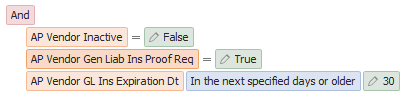
This Condition is looking for Vendors where:
▪The "Inactive" checkbox in AP Vendor Setup is not checked
▪The "Proof Required" checkbox for General Liability insurance in AP Vendor Setup is checked
▪The General Liability insurance's "Expiration Date" is any date before today's date plus 30 days
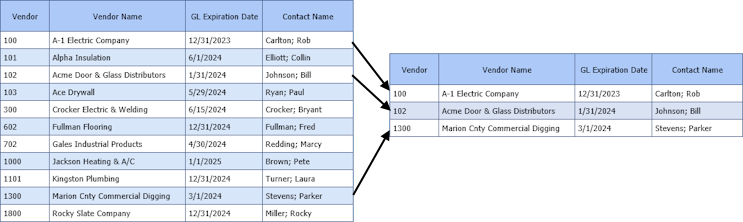
When the Task runs on 2/15/2024, MyAssistant looks through all active Vendors in Accounts Payable that require General Liability insurance. It then compares the General Liability insurance expiration dates in AP Vendor Setup to the current date plus 30 days (3/16/2024). If a Vendor's General Liability insurance expires on or before 3/16/2024, that Vendor is picked up by the Task Condition:
3.MyAssistant determines who should be emailed based on the Recipients on the Task. Email addresses can be typed in the Email Step of Task Setup, or MyAssistant can look up who to notify using an Email Directory.
Example: MyAssistant looks up email addresses for each Vendor with expiring General Liability insurance, then creates a separate for email for each one:
.png)
4.Emails and attachments are created based on what's selected to send in the Email Step of Task Setup. For example:
▪Lists & form letters can be created in the body of the email
▪Spreadsheets are attached if a MyAssistant Spreadsheet Template is used
▪Reports added from Sage menus are generated and attached
Example: MyAssistant emails each Vendor a separate form letter containing only their information:
.png)
Related Links
How to Start Using MyAssistant
Send a List of Notifications Overview
Send a Spreadsheet Overview
Send Reports & Documents Overview
Task Setup
|

