|
These settings control what Sage user MyAssistant will use setting up Tasks.
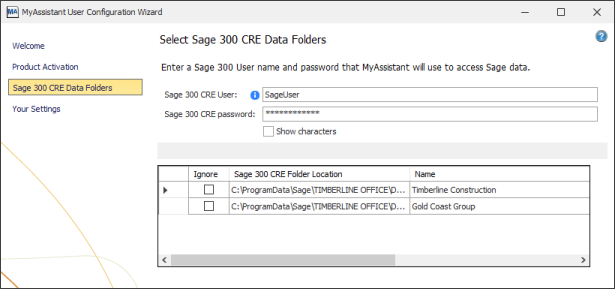
Specify Sage 300 CRE data folder locations
The data folders specified during the MyAssistant Server Configuration will be listed in the table. Click in the grid to select any data folder paths that do not prefill.
Check the "Ignore" checkbox for any Sage 300 CRE data folders that should not be accessed on this workstation.
Sage 300 CRE User and Password
Enter the Sage User & password for the person using MyAssistant. This will be used to:
▪Access Sage 300 CRE reports that can be attached to Tasks
▪Test Task Conditions
▪Test MyAssistant Formulas
▪Preview MyAssistant Spreadsheet Templates
|

